-
 By
-
By
-
-
 12 Oct, 2026
How to Reduce Micromanagement with Task Tracking
Key Takeaways
- The task management software helps managers review in-progress tasks, track deadlines, and manage responsibilities without having to ask repeatedly.
- Clearer task assignments, priorities, and deadlines that empower employees to manage their work independently.
- Workflow management and a Kanban board help visualise task progress, eliminate bottlenecks, and improve overall collaboration.
- It will automate recurring tasks, share files, and reduce manual follow-ups and administrative work.
- Task tracking allows managers to evaluate progress, support employees in improving productivity, and build a good culture.
Micromanaging tends to pose a significant problem. This happens when managers feel the need to keep an eye on whether employees are working, tasks are progressing, and deadlines are being met. While there must be some information about the team’s performance, checking up on every step, freedom and putting a lot of workload on the team.
Using the right approach to Task management software can enable businesses to eliminate permanent control over the employees and usher in data-based task monitoring. Rather than bugging employees for updates regularly, managers will be able to find everything in the system about task progress, deadlines, and the like. According to Asana’s 2023 Anatomy of Work Global Index, knowledge workers spent 58% of their time on activities such as task coordination and managing work processes.
With the right combination of task-tracking, workflow management, and employee time-tracking technologies, managers will stay informed while employees will have autonomy over their work.
In this article, you will learn how task management software helps you reduce micromanagement.
Let’s dive in to learn more!
1. What is micromanagement and why is it occurring?
Micromanagement is the over-monitoring of managers in employees’ daily activities as they carry out their tasks. This also implies repeatedly inquiring about progress, checking whether the work is complete, and frequently changing priorities.
Micromanagement is usually the result of insufficient information available to managers. When information about the task is scattered across emails, spreadsheets, chats, and other applications, managers feel they have to personally inquire about progress. The solution to this problem is a centralised management tool that enables managers to access a single source for tasks to be carried out, deadlines, responsibilities, progress, and relevant documents. The workflow management software enables managers to set tasks, assign them to employees, and easily track progress.
For your knowledge, below are some ways to explain how task tracking helps in micromanagement:
2. Create Clear Ownership
Making responsibilities clear from the outset is one of the easiest methods to limit micromanagement. Through task management systems, a manager can assign tasks to a team and specify their order of priority and deadlines. Employees understand their responsibilities, and managers know who’s in charge of what, so they don’t have to repeatedly ask about an operation’s progress.
3. Split complicated projects into manageable tasks
Monitoring large projects as a single task can be problematic. It is possible to gain better visibility into progress by splitting large tasks into multiple subtasks. Task management software makes it possible to create tasks and break complicated work into subtasks that may receive individual owners, deadlines, and priorities. This way, managers can be aware of the project’s completed, ongoing, or future stages, while employees can work automatically.
4. Implementing workflow management instead of constant follow-ups
Working with workflow management ensures that employees know the work is going through all the steps. Kanban and smart workflow management software enable teams to visualise the movement of work through tasks using drag-and-drop boards, customised stages, and different views for teams, projects, or roles.
5. Setting priorities and deadlines
Not every task needs to be monitored. In the absence of setting priorities, managers might have to follow through very often in order to keep track of things. By implementing task-tracking software, managers can set priorities and deadlines from the outset. The employees can then arrange their workload.
6. Apply Time tracking for transparency instead of observation
If employees believe their every minute is being monitored, time tracking can lead to negative consequences. However, when implemented correctly, employee time-tracking software will deliver valuable insights into workload, project developments, and time spent on specific tasks. Moreover, it generates reports and timesheets.
The goal should be to understand how the job is going, not to keep questioning employees about how they spend their time. For instance, if a certain task consistently takes longer than expected, the information will prompt valuable discussions about:
- Workload
- Resources
- Processes
- Training
7. Track workload and stop imbalanced task allocation
Micromanagement may also occur when the manager does not know how much work each employee has. Using a centralised task management system allows you to see which tasks are assigned and the team’s capacity. Therefore, it will help the managers understand who is overburdened and who can handle extra work.
Task tracking software provides resource management information, allowing managers to allocate work more effectively.
8. Automate recurring duties
Sometimes instructing employees to perform the same duties leads to unnecessary administrative troubles for the managers. With workflow management software, managers can configure regular, permanent, or recurring tasks. The specifications for the frequency and duration of the recurring tasks can be adjusted, and individuals assigned to work can start receiving the notifications without daily, weekly, or monthly reminders from managers.
By automating, employees will know about their duties, while managers can concentrate on other things.
9. Attach files to tasks
Insufficient information is another reason for numerous queries. If the documents are not where they are supposed to be, many workers have to consult their managers to find files or instructions. By using task management software and its file storage feature, users can attach various files to tasks and projects. Sharing the documents with the task makes employees independent and stops them from asking unnecessary questions.
10. Utilise a real-time dashboard for enhanced visibility
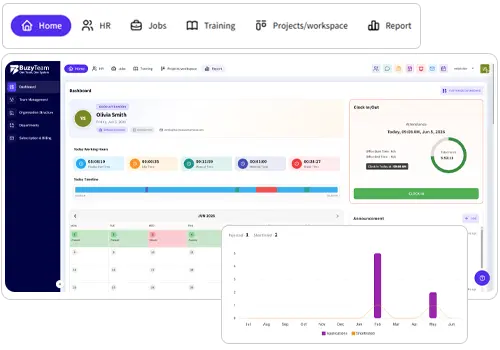
Visibility is essential for managers, but they don’t have to contact their employees to obtain it. A customizable dashboard can provide consolidated information on tasks, projects, team members, deadlines, and process oversight. The task management software allows customisation of task views, addition of users, and management of many tasks and users.
Visualisation of a task will make it possible to distinguish between completed, ongoing, and overdue tasks. Thus, managers will be able to spot issues without having to request status reports from all employees.
11. Detect work process issues with data
Tracking tasks becomes even more beneficial when managers use the information to improve processes rather than just monitoring employees.
For instance, if many tasks are repeatedly delayed at a particular stage in the workflow, it may indicate a problematic process, unclear responsibilities, unreasonable deadlines, or a lack of resources. Task tracking can help managers integrate project and task data with time-tracking and productivity reports to better understand how much work is done and to detect productivity problems.
12. Usage of reports for outcome-based management
Reports are helpful for outcome-oriented management, as they enable employees to analyse their workers’ performance without constant checks. Reports enable managers to use various information about tasks and projects, including time used deadlines, and completion rates. A workflow management system produces reports and analytics that bring all this data together.
Managers can then use the gathered knowledge in their discussions with subordinates. Instead of asking whether a person is occupied with work, they will have the chance to discuss the results of their work or opportunities for improvement. Technologies by themselves cannot remove micromanagement from the management practice. There should also be trust to do their jobs.
Task management should be considered a system of reporting and communication rather than just a supervisory tool. It is essential that employees know what information they collect and why it is necessary.
Wrapping up
Less micromanagement does not equal less accountability. Organisations should strike a quality balance between clearly defined duties for their employees and visibility of work progress for managers. Proper task tracking serves as the basis for this approach. A combination of clearly defined responsibilities, priority setting, deadline management, task breakdown, application of the Kanban method, recurring tasks, automation, document sharing, work visibility, time tracking, and reporting minimises the need for manual follow-ups.
Using task management software helps managers stay focused on outcomes, identify bottlenecks, allocate resources, and support workers. At the same time, employees can gain greater clarity and independence in their work processes.
Frequently Asked Questions
1. In what ways does task management software assist in limiting micromanagement?
One practical feature of task management software is that it provides managers with an instant overview of projects, timelines, goals, and responsibilities. As a result, employees manage their workload without having to keep reporting to their managers.
2. What is task tracking?
Task tracking entails keeping tabs on tasks in terms of how they are progressing, what stage they are in, or when they are due. Task tracking helps ensure project continuity and completion by keeping teams accountable, monitoring setbacks, and ensuring deadlines are met.
3. What is workflow management?
Workflow management refers to the process, responsibilities, and important elements that need to be completed for the work to be done. Employees are aware of what they have to do and in what terms. This saves them from the need to rely on managers for instructions and guidance.
4. How does an employee time tracker help with micromanagement?
Employee time-tracking software helps prevent micromanagement by providing information on working hours, time spent on tasks, and more. It helps managers make decisions rather than constantly checking on an employee.
5. Which features should be included in task management software when seeking it?
When searching for task management software, companies should pay attention to features such as creating and assigning tasks and sub processes, setting deadlines and priorities, using Kanban, supporting recurring tasks, file sharing, time tracking, and workload management. These abilities can help improve visibility, collaboration and accountability.